How to Measure Your Yard
The fastest way is to trace it on a satellite photo of your own address. It takes about two minutes and works for lawns, beds, patios, and driveways. Here is every step, with pictures of the real tool.
The pictures were taken at Folger Park, a public park on Capitol Hill in Washington, DC, so no one's home is shown. On your screen the map uses Mapbox satellite imagery; these screenshots use the District of Columbia's 2023 aerial photos. Everything else is exactly what you will see.
Measure on the satellite map
Step 1. Open the map
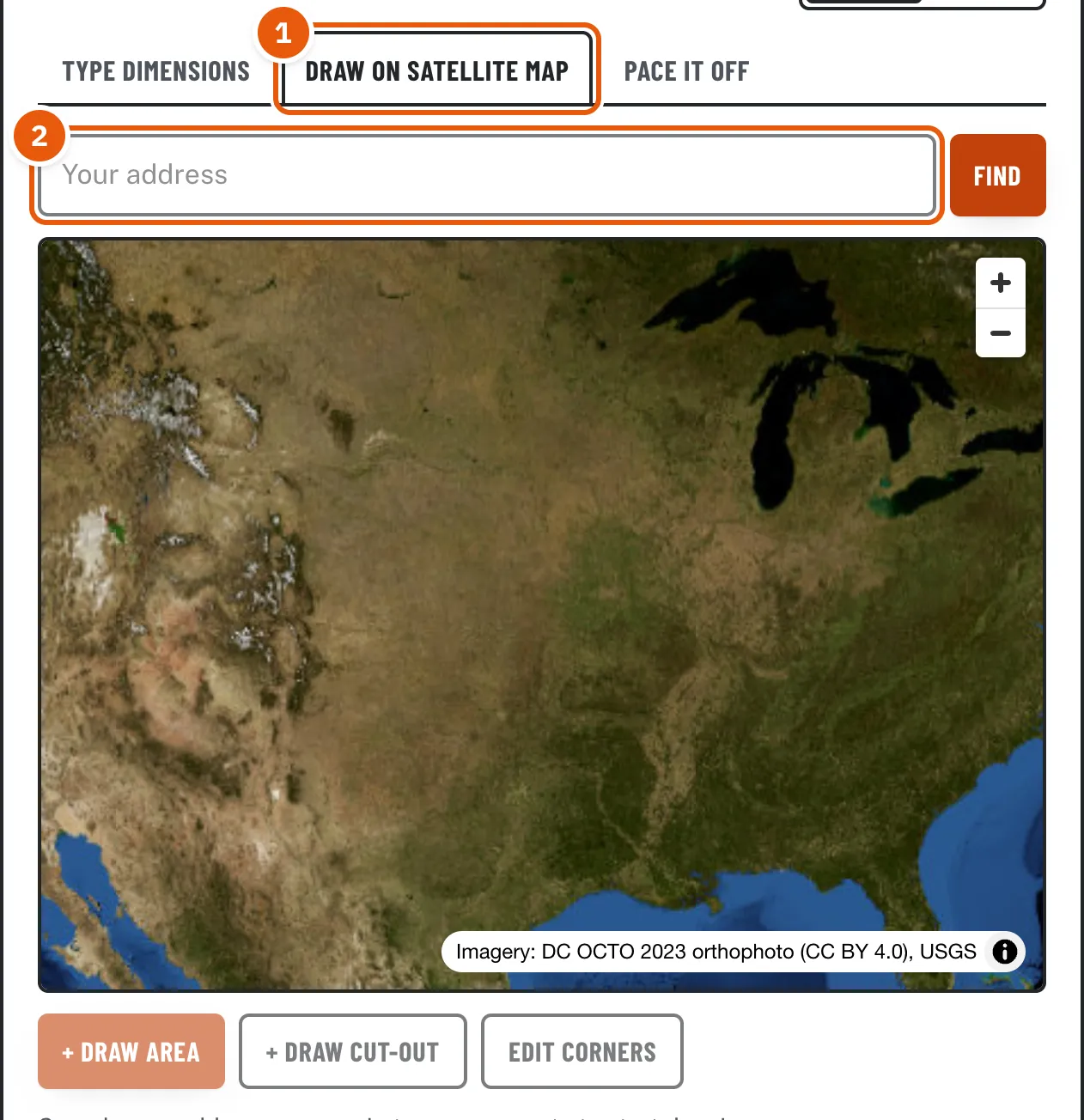
Most calculators on this site start with a Measure box. Choose the Draw on satellite map tab (1). The lawn size calculator opens straight to it. The address box (2) sits above the map.
Step 2. Find your property
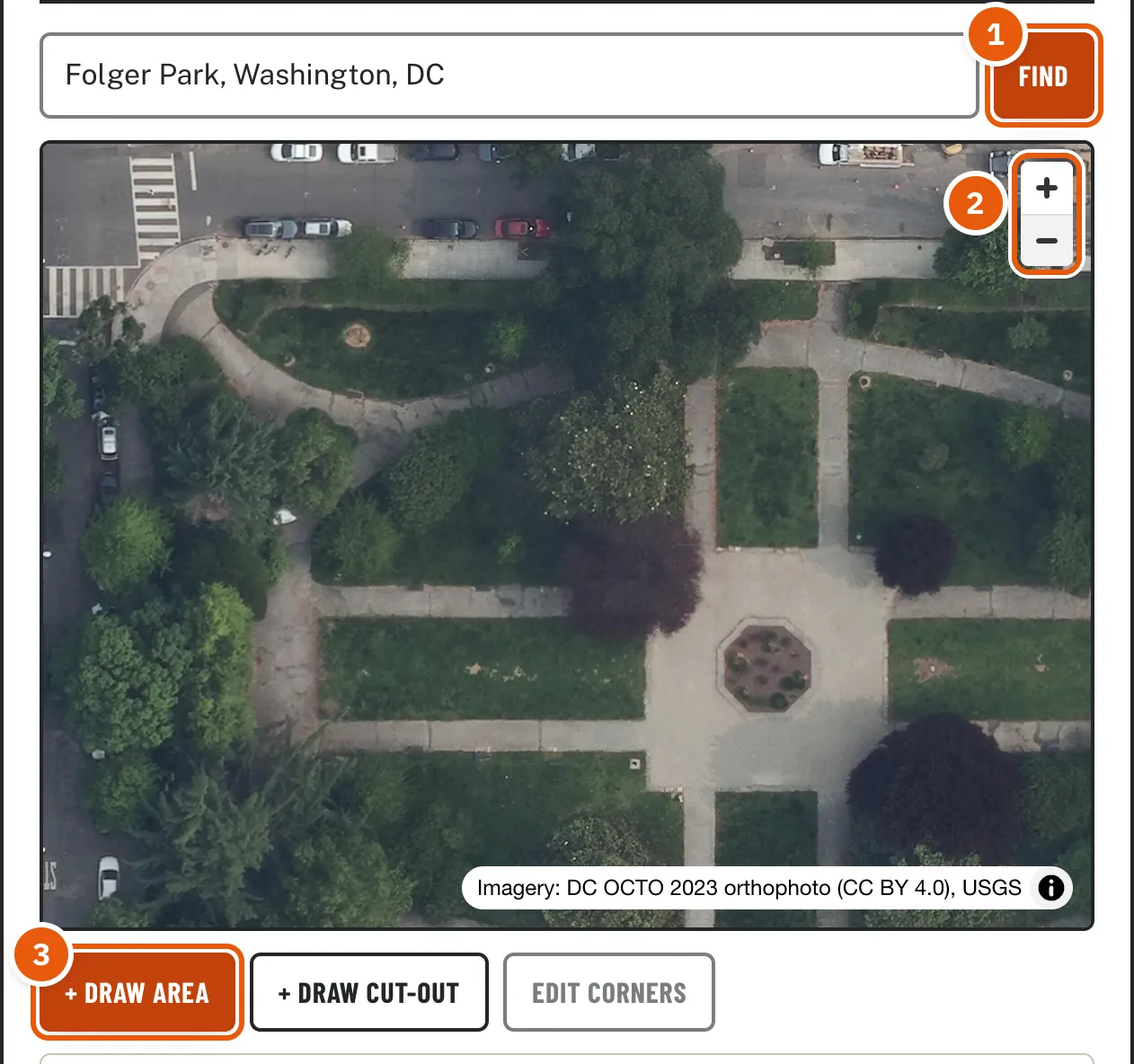
Type your street address and press Find (1). If more than one match comes up, pick yours from the list. The map flies to it and zooms in close.
- No match? Add the city or ZIP code, or drag and zoom the map to your home by hand.
- Use the + and - buttons (2) to frame the whole area you want to measure. Everything you plan to trace should fit on screen.
- Once you are close enough, Draw area (3) turns solid orange. If it is still faded, zoom in a step or two. This stops anyone from measuring a whole town by accident.
Step 3. Trace your first area
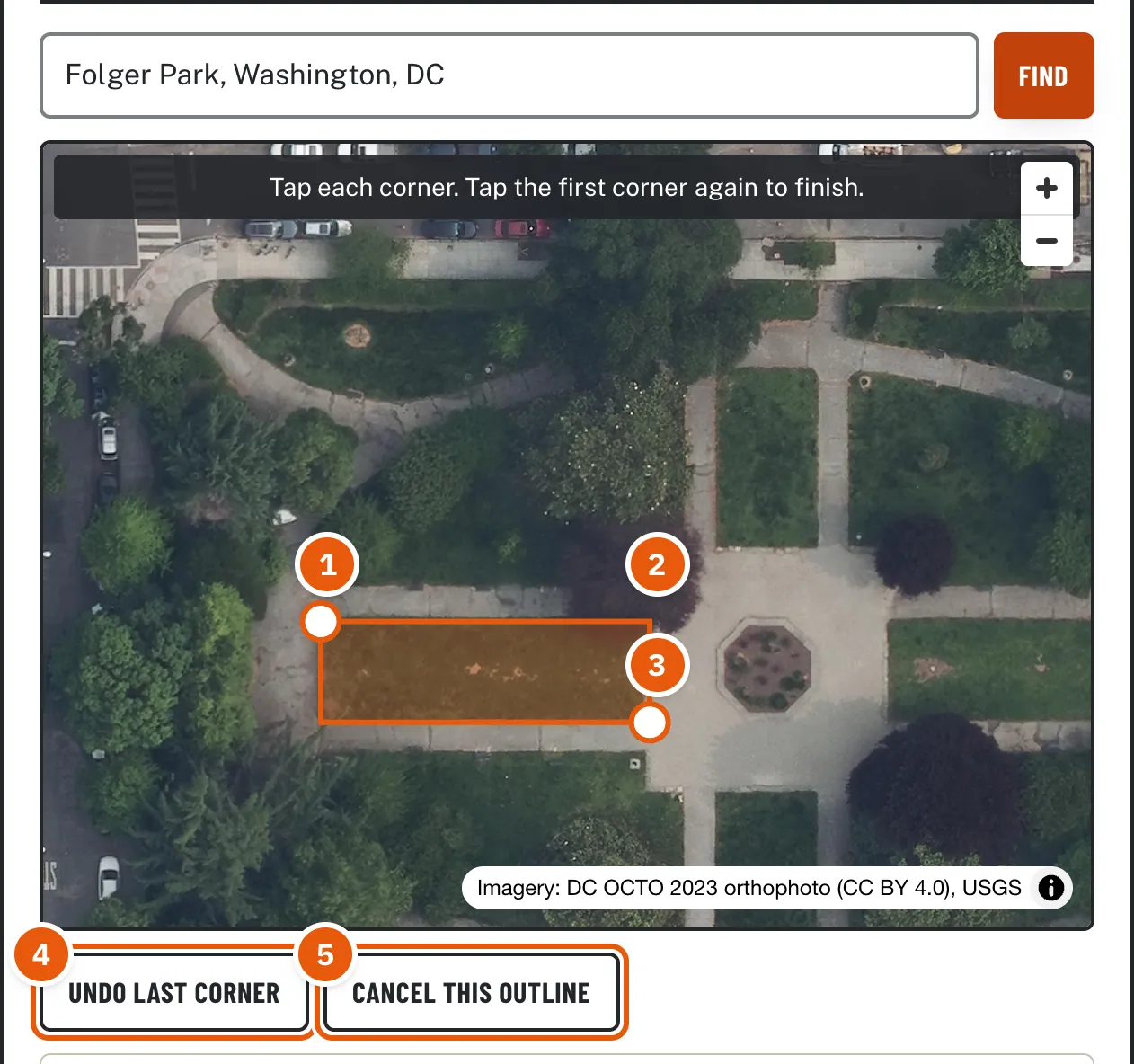
Press Draw area. A dark bar appears on the map: Tap each corner. Tap the first corner again to finish.
- Tap one corner of your lawn or bed (1).
- Go around the edge in order, tapping each corner (2, 3). An orange shape fills in behind you.
- Tapped the wrong spot? Press Undo last corner (4) and tap again. You can undo as many corners as you like.
- Want to start over? Press Cancel this outline (5). On a computer, the Esc key does the same.
- When every corner is in, tap the first corner again to close the shape.
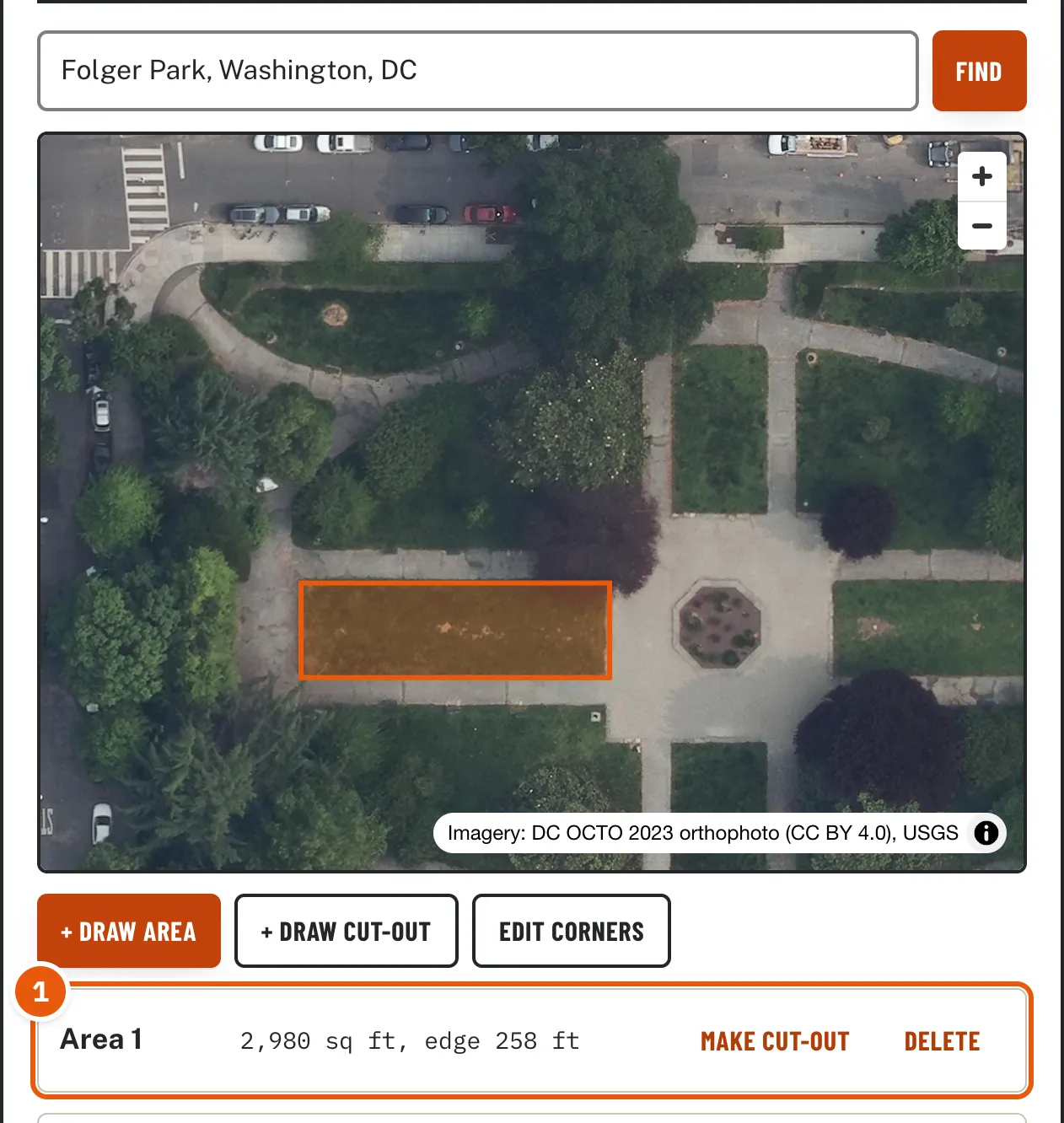
As soon as the shape closes, it appears in the list under the map as Area 1 (1), with its square footage and the length of its edge. The edge length is what you need for edging, borders, or fencing.
Step 4. Curved edges and odd shapes
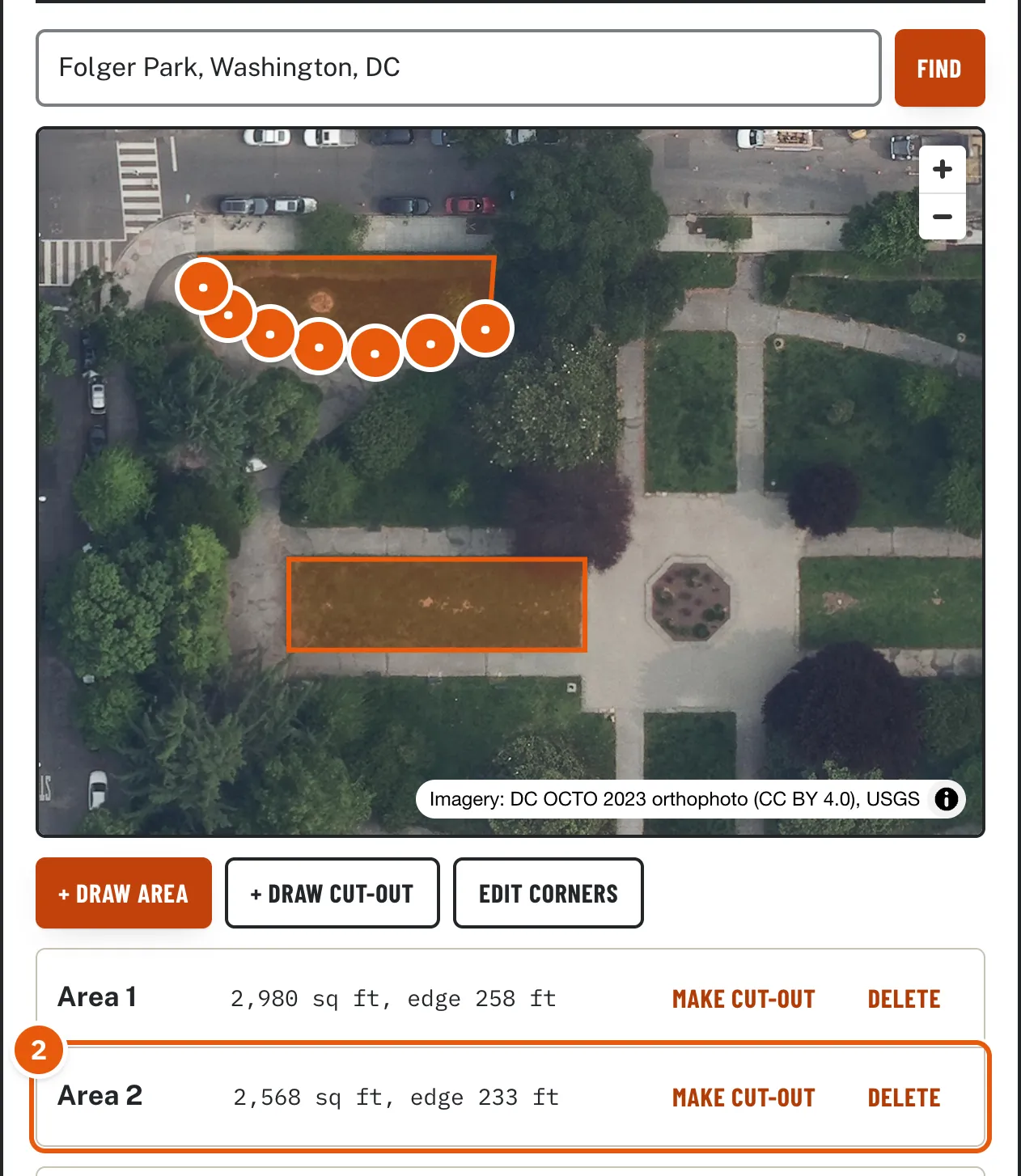
The map joins your taps with straight lines, so a curve needs more taps. Follow the curve with a tap every few feet, as with the dots along the bottom of this lawn. More taps give a closer number. Two things to know:
- Keep your taps a finger-width apart. Tapping right on top of the last point (or the first one) finishes the outline.
- For something small, like a tree ring or a narrow bed, zoom in a step before you trace it, then zoom back out.
Step 5. Add more areas
Front yard and back yard? Side strip? Press Draw area again for each piece. Every area adds into one total. Each piece stays in the list with its own size, so you can delete one or change it without redrawing the rest.
Step 6. Subtract what you are not covering (cut-outs)
Often the easiest way is to outline the whole space, then remove what does not count: the house, a patio, a shed, a flower bed, a pool. Press Draw cut-out (1) and trace it the same way (2). Cut-outs show with a white outline, and the list shows them as minus (3).
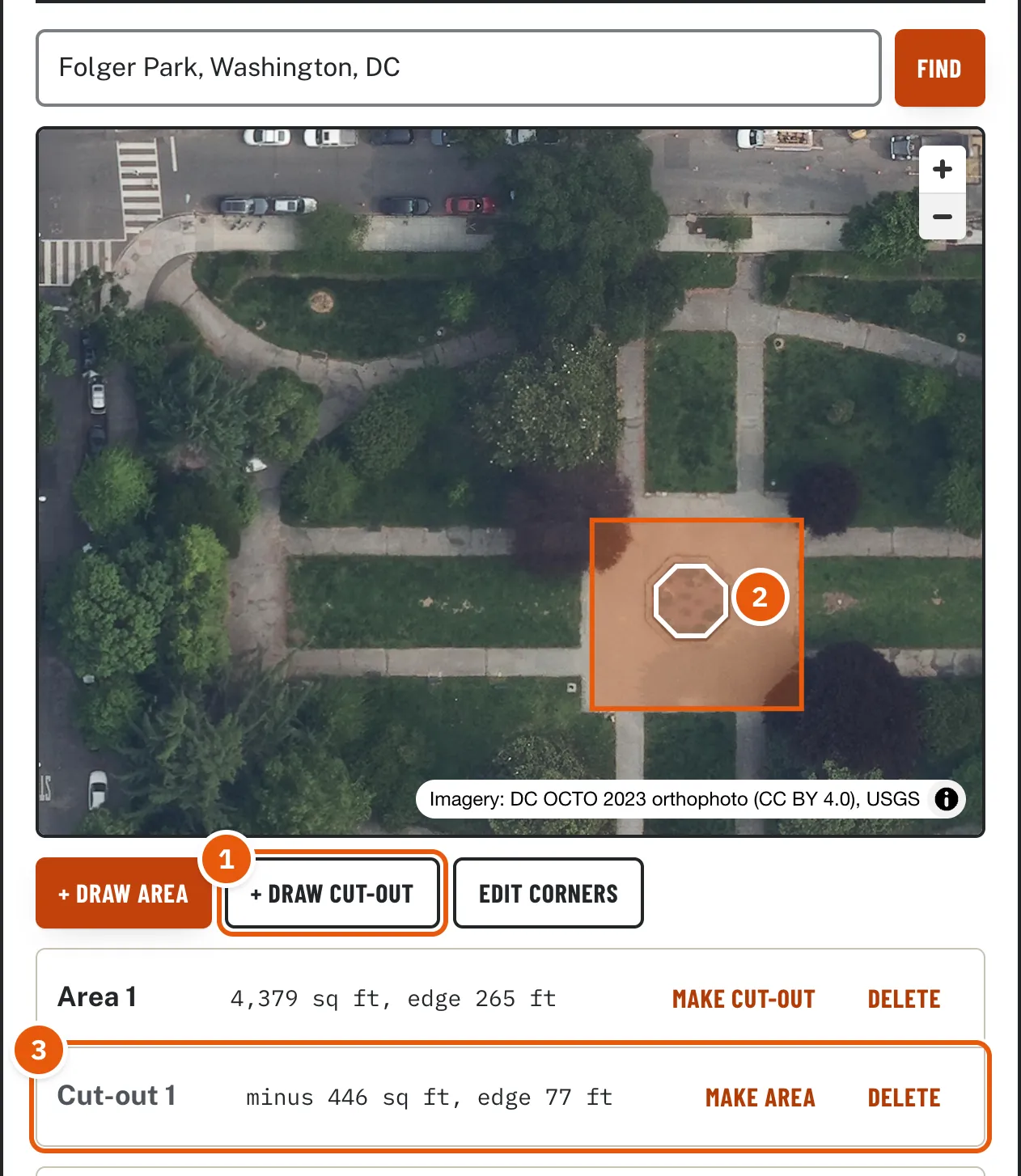
Drew something as an area that should have been a cut-out, or the other way around? Press Make cut-out or Make area next to it in the list.
Step 7. Fine-tune the corners
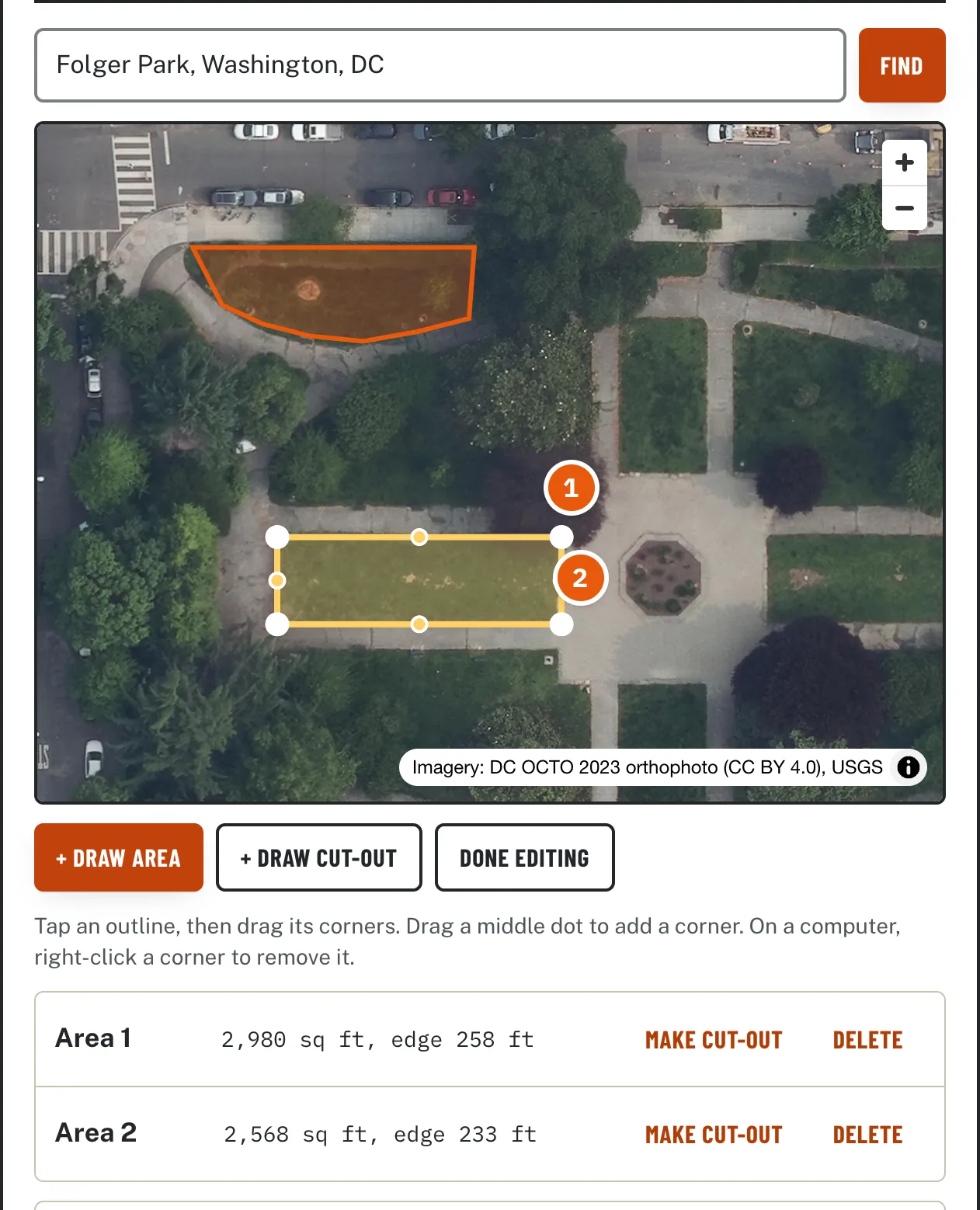
Press Edit corners, then tap an outline. It turns yellow and shows a handle on every corner.
- Drag a corner (1) to move it.
- Drag one of the small dots halfway along an edge (2) to add a new corner there, handy when a straight edge should bend.
- On a computer, right-click a corner to remove it (a shape needs at least three). On a phone, delete the outline from the list and draw it again.
- Press Done editing when you are finished. The numbers update as you go.
Step 8. Use the number
The total (1) is everything you drew, minus the cut-outs, in square feet and acres. The calculators under it (2) open with your measurement already filled in, so you go straight to how many bags, yards, pallets, or tons to order. On any material calculator, the measurement feeds the Order Plan directly.
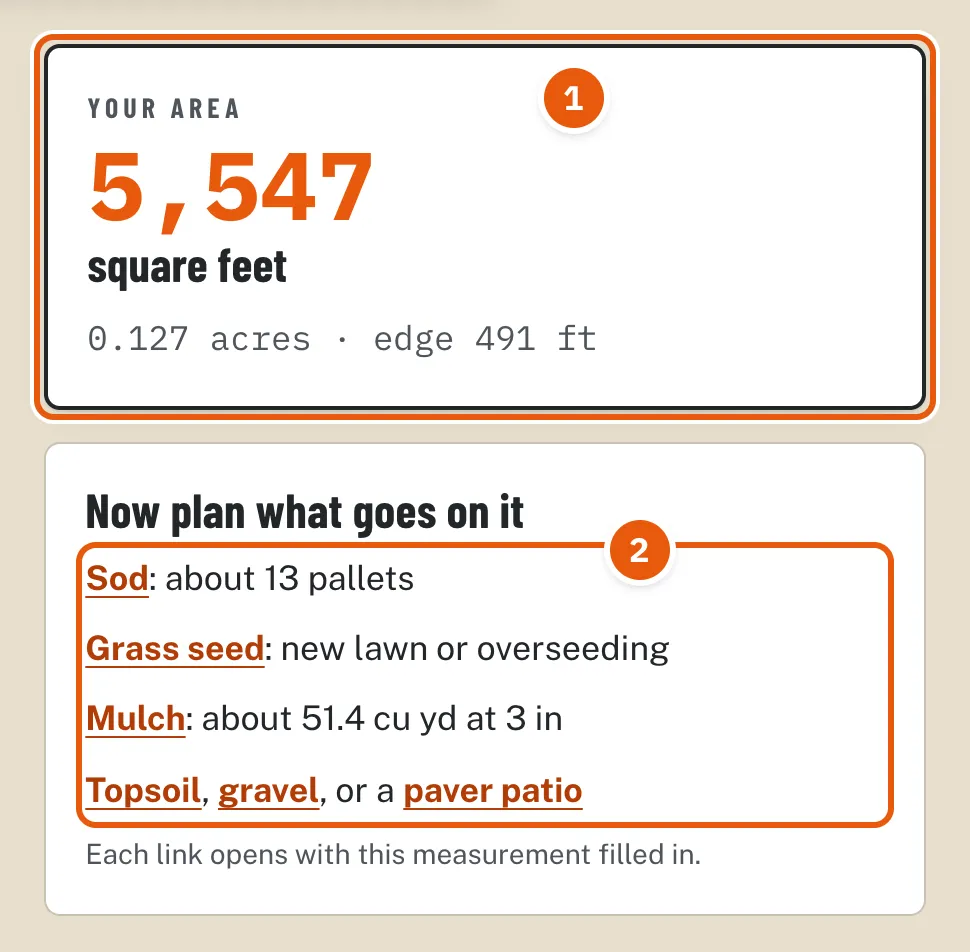
Want to come back later or send it to someone? Open a material or project calculator from those links and press Share plan. The link saves your outlines, so whoever opens it sees exactly what you drew.
On a phone
The map is built so you can still scroll the page. With one finger you scroll past the map as usual; to move or zoom the map itself, use two fingers. If you try with one, the map reminds you. Taps for drawing corners are single taps, as normal.
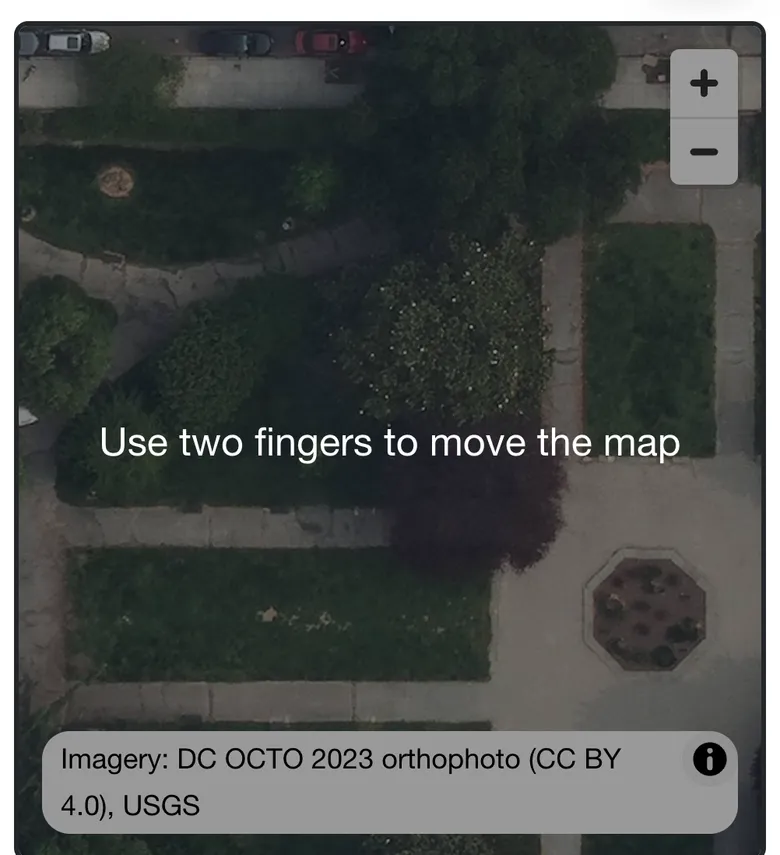
On a computer, the mouse wheel scrolls the page too. Hold Ctrl (Cmd on a Mac) while scrolling to zoom the map, or use the + and - buttons. Click and drag to move it.
Getting an accurate number
- Trees hide edges. From above you see the top of the tree, not the lawn under it. If the grass continues under a tree, trace where you think the edge runs, or measure that part with a tape. Roof overhangs work the same way: the roof edge is usually a foot or two past the wall.
- Photos can be a few years old. If you have added a patio or a bed since, trace what is there now, not what the photo shows.
- Slopes are bigger than they look. The map measures the flat footprint. A slope that rises 1 foot in every 4 adds about 3 percent of real surface; 1 foot in 2 adds about 12 percent. Raise your waste allowance for steep ground.
- Check one edge. When the order is expensive (sod, pavers), measure one long side with a tape and compare it with the edge length from the map. If they agree, the rest will be close.
- Decide what counts. For mulch, measure the bed itself, not the lawn around it. For sod, leave out paths and beds. For a gravel driveway, include the full width you plan to cover, edges and all.
If something goes wrong
- Draw area and Draw cut-out are faded and do nothing
- Zoom in closer on your property. Drawing unlocks at street level.
- The map will not move on a phone
- Use two fingers. One finger scrolls the page.
- The outline closed before I finished
- You tapped too close to the first or last point. Press Edit corners and drag a middle dot to add the missing corners, or delete it and redraw with taps a little farther apart.
- I tapped the wrong spot
- While drawing, press Undo last corner. After it is finished, use Edit corners to drag it into place.
- The address is not found
- Add the city and state or ZIP code. Or skip the search and zoom in on the map by hand.
- The photo is blurry or old where I live
- Use the photo for the outline you can see and a tape for the rest, or switch to the Type dimensions tab.
- The total says the cut-outs are bigger than the area
- A cut-out was drawn as an area or the other way around. Press Make area or Make cut-out next to it in the list.
- There is no satellite map tab
- The map is unavailable right now. Use Type dimensions or Pace it off; both are described below.
With a tape measure
Choose the Type dimensions tab. Break the yard into simple shapes, measure each one, and add them as separate areas. Use cut-outs for anything in the middle you will not cover.
- Rectangle: length and width. Most lawns and patios are one or two of these.
- L-shape: the overall length and width, then the size of the missing corner.
- Circle: the diameter, straight across through the middle.
- Triangle: all three sides. Any triangle works, not just right angles, which makes it handy for odd corners.
- Ring: the outer diameter and the inner one, for a mulch ring around a tree or a border around a round bed.
A 100 ft tape and a helper make it quick. Measure to the nearest half foot; that is plenty for ordering.
By pacing it off
No tape and no map? Choose Pace it off. Walk the length at a normal pace and count your steps, then the width. Most adult steps are about 2 to 2.5 feet. For a better number, pace something you know first, like a 30 ft driveway, and divide 30 by your steps. Pacing is good for a first estimate; check with a tape before a big order.
Your privacy
The address you search for is sent to Mapbox, which finds it on the map and supplies the imagery. We do not store your address. Your outlines stay in your browser. A share link does contain the outline's map position, so anyone you send it to can see where the property is. See the privacy page for details.
Try it on your yard
Measure here, then carry the number into any calculator.
Measure your yard
Almost there
Questions people ask
How do I find the square footage of my yard?
Trace it on a satellite photo: search your address, press Draw area, tap each corner, and tap the first corner again to close it. The square footage appears right away. Without a map, measure the length and width with a tape (or count your steps) and multiply. Split odd shapes into rectangles and add them up.
How accurate is measuring a yard on a satellite map?
Close enough to order materials on an open lawn where you can see the edges, because orders round up and include a waste allowance anyway. Accuracy drops where trees, roof overhangs, or shadows hide the edge. When it matters, check one long edge with a tape and compare it with the edge length the map shows.
How do I subtract my house, driveway, or patio?
Outline the whole yard as an area, then press Draw cut-out and trace the house, patio, or bed you do not want to count. Cut-outs show in white and are subtracted from the total. You can also turn any outline into a cut-out later with Make cut-out.
Can I measure the front and back yard together?
Yes. Draw each one as its own area. The total adds every area and subtracts every cut-out, and the list under the map shows each piece on its own.
Does the map measure slopes?
No. A photo from above shows the flat footprint, so a sloped lawn has more real surface than the map shows. A slope that rises 1 foot for every 4 feet across adds about 3 percent; 1 foot in 2 adds about 12 percent. Add that to your waste allowance for steep areas.
How many square feet is a pallet of sod?
It varies by farm and grass type, so check with your supplier. This site uses 450 sq ft as a common example, and the sod calculator lets you change it.
Sources
- District of Columbia, Office of the Chief Technology Officer, Aerial Photography (Orthophoto) 2023, CC BY 4.0 (imagery in the measuring guide screenshots)
- OpenStreetMap contributors, Folger Park, Washington, DC (ODbL), used to check the scale of the guide screenshots
Last reviewed: . How we calculate